tutorials
•

Founder, LearnGit.io
One of my favorite terminal customizations is adding Git repository/branch information to my prompt. I use ZSH as my default shell, and that’s a good thing here because ZSH ships with a function called vcs_info specifically for grabbing version control information.
1. Open your .zshrc config file
If your config file doesn’t exist, create it first using touch ~/.zshrc
2. Load in the version control system (VCS) info
Add the following lines to your .zshrc config file.
In the snippet above, %b will be replaced by the branch name
3. Add version control info to PROMPT
After loading in VCS info (in step 3 above), use the vcs_info_msg_0_ variable in your PROMPT string:
Optional: If you want that branch info to display aligned to the right, remove the ${vcs_info_msg_0_} line from your PROMPT and add an RPROMPT line to your config file instead:
4. Reload to see the changes
Save, and reload your zshrc config file
Admire your handiwork!
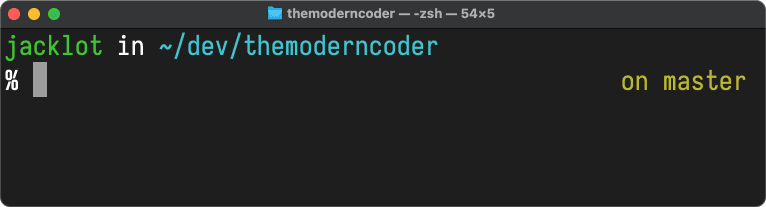
In this screenshot I set RPROMPT=\$vcs_info_msg_0_ in my .zshrc config so that branch information is right-aligned
Go further with vcs_info and nerdfonts
That’s it. If you want to go further, vcs_info provides other version control information such as staged/unstaged files, stash information etc. Check out this fantastic article by Arjan van der Gaag to see what else you can do.
To add iconography to your prompt — like how in this article's cover photo I added the Git branch icon — check out nerdfonts.
•